
Issue 11

UPMC Consumer Advantage Mobile App—If Your Members Don’t Have It...They Should!

The UPMC Consumer Advantage mobile app (6.0) is available on the app store. This newest version boasts two major enhancements:

  1. Eligible Expense Scanner: Allows members to scan a product bar code to determine its eligibility based on the 213(d) list.
  2. HSA Investment Details: HSA members have access to view info about their investments.

Allowing members the ability to do virtually everything on their mobile device makes sense! Encourage your members to get the app!

Registration the first time requires entering a username and password.

The typical mobile app username and password instructions:

  1. The Username format is LastNameFirstNameDOB(ddmmyy), e.g., DoeJane160773 (Jane Doe, July 16, 1973).
    • The typical FSA password is the member’s zipcode.
    • The typical HSA password is the member’s last five digits of their social security number.

Note that after the first time—your members secure their app by assigning themselves a four-digit PIN!

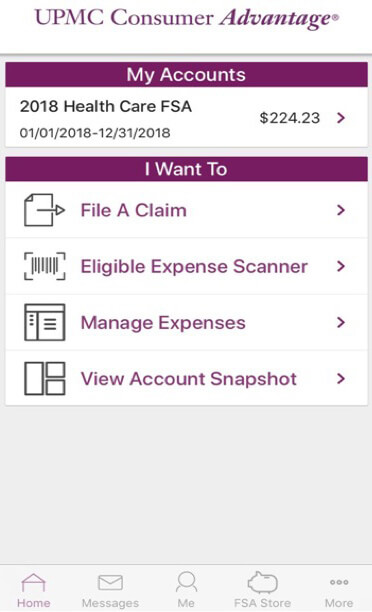
UPMC Consumer Advantage Mobile App Image

Here are other features available to UPMC Consumer Advantage members who use the mobile app:

Connects you with the details:

  • Quickly check available balances 24/7.
  • View charts summarizing account(s).
  • View claims requiring receipts.

Provides additional time-saving options:

  • File a claim toward your medical FSA and HRA.
  • Take or upload a picture of a receipt and submit for a new or existing claim.
  • Pay bills from any account and add a payee.
  • Access FSA and HSA Store.
  • Using the dashboard, enter medical expense information and supporting documentation.
  • Retrieve your forgotten username/password.
  • Report a debit card as lost or stolen.
UPMC Consumer Advantage Mobile App Image

Here are other features available to UPMC Consumer Advantage members who use the mobile app:

Connects you with the details:

  • Quickly check available balances 24/7.
  • View charts summarizing account(s).
  • View claims requiring receipts.

Provides additional time-saving options:

  • File a claim toward your medical FSA and HRA.
  • Take or upload a picture of a receipt and submit for a new or existing claim.
  • Pay bills from any account and add a payee.
  • Access FSA and HSA Store.
  • Using the dashboard, enter medical expense information and supporting documentation.
  • Retrieve your forgotten username/password.
  • Report a debit card as lost or stolen.