
Using your UPMC for Life Flex Spend Card
You have access to resources that can help you understand how your UPMC for Life Flex Spend Card works, where you can use your card, what types of products you can buy, and more!
The Flex Spend Card benefit varies by plan year. If you’d like to learn about the Flex Spend Card benefit for the current plan year, visit the 2026 Flex Spend Card page.
If you’d like to learn more about using your Flex Spend Card for healthy foods, please visit our preventive care reward program page.
Jump to a section:
- What is my allowance amount?
- How can I check my UPMC for Life Flex Spend Card balance?
- How to use your UPMC for Life Flex Spend Card
- Using your UPMC for Life Flex Spend Card for OTC products
- What OTC products are covered at retail stores?
- How to get OTC products by mail
- Using your UPMC for Life Flex Spend Card for home safety products
- Using your UPMC for Life Flex Spend Card for dental, vision, and hearing services
- Using your UPMC for Life Flex Spend Card for medical service costs
- Using your UPMC for Life Flex Spend Card for fitness
- How to submit a claim for reimbursement
- Frequently asked questions about using your UPMC for Life Flex Spend Card
- UPMC for Life Flex Spend Card additional resources
What is my allowance amount?
Select your plan from the dropdown below to see your allowance for 2027. Use your UPMC for Life member ID card to confirm your plan name and CMS plan identifier (located under your plan name on your member ID card). Allowance amounts and how the Flex Spend Card can be used vary by plan. Not all UPMC for Life plans offer the Flex Spend Card benefit.
- HMO Deductible Rx (HMO) | H3907-037-000
- HMO No Rx (HMO) | H3907-002-000
- HMO Preferred Rx (HMO) | H3907-064-000
- HMO Premier Rx (HMO) | H3907-059-001
- HMO Premier Rx (HMO) | H3907-059-002
- HMO Premier Rx (HMO) | H3907-061-000
- HMO Rx (HMO) | H3907-058-001
- HMO Rx (HMO) | H3907-058-002
- HMO Rx (HMO) | H3907-058-003
- HMO Rx (HMO) | H3907-063-000
- HMO Rx Choice (HMO) | H3907-057-001
- HMO Rx Choice (HMO) | H3907-057-002
- HMO Rx Choice (HMO) | H3907-057-003
- HMO Rx Choice (HMO) | H3907-057-004
- HMO Rx Choice (HMO) | H3907-057-008
- HMO Rx Choice (HMO) | H3907-062-000
- Essential Rx (PPO) | H5533-017-001
- Essential Rx (PPO) | H5533-017-002
- PPO Premier Rx (PPO) | H5533-013-000
- PPO Rx Choice (PPO) | H5533-019-000
- PPO Rx Choice (PPO) | H5533-020-000
- PPO Salute (PPO) | H5533-016-001
- PPO Salute (PPO) | H5533-016-002
How can I check my UPMC for Life Flex Spend Card balance?
You can find your Flex Spend Card balance in three easy ways:
- Call our automated system 24/7 at 1-833-293-6483 (TTY: 711). Have your UPMC for Life member ID card ready. You will enter your 11-digit member ID number to check your balance.
- Log in to the UPMC Health Plan member site.
- Download and log in to the UPMC Health Plan app.
How to use your UPMC for Life Flex Spend Card
The UPMC for Life Flex Spend Card gives you extra healthcare dollars to help you support your healthcare needs. Depending on your plan, here’s how the Flex Spend Card works:
- Some UPMC for Life plans get two Flex Spend Card allowances. These are yearly allowances that can be used for dental, vision, and hearing services, and medical service costs, premier fitness locations, fitness kits, over-the-counter (OTC) products, and home safety products.
- Dental, vision, and hearing services—You can use your plan benefits first and then use your Flex Spend Card second to help pay for any out-of-pocket dental, vision, and hearing costs.
- Medical service costs, premier fitness locations, fitness kits, OTC products, and home safety products:
- Medical service costs—Use your card anytime you are asked to pay out-of-pocket for your care, like for a doctor’s office visit, urgent care visit, physical therapy, x-ray, or lab service. You can use $50 of your allowance per transaction.
- Premier fitness locations—Use your card to pay for memberships, classes, and other activities at any of our premier fitness locations.
- Fitness kit—Use your card to buy one fitness kit per year. You can choose from several fitness kit options based on your needs.
- OTC products—Use your card to buy covered OTC products at participating retail stores and through our mail-order catalog.
- Home safety products—Use your card to buy covered home safety products from mail-order catalog.
- Some UPMC for Life plans get one Flex Spend Card allowance. This is a quarterly allowance that can be used for OTC products and home safety products.
- OTC products—Use your card to buy covered OTC products at participating retail stores and through our mail-order catalog.
- Home safety products—Use your card to buy covered home safety products through our mail-order catalog.
Use the chart in the section above to find your specific plan allowance amount(s). You can also see the Flex Spend Card catalog or your Evidence of Coverage for your specific benefit information.
You cannot use your Flex Spend Card to pay for prescription drugs or your monthly plan premiums.
Using your UPMC for Life Flex Spend Card for OTC products
Find participating retail stores
If you want to shop for OTC products in person, you can use your card at any of our participating retail stores, including Costco, Dollar General, Giant Eagle, Target, Walgreens, and Walmart.
Use the Store Locator to see the full list of participating retail stores and find specific retail store locations near you:
UPMC Health Plan member site
- Log in to the UPMC Health Plan member site.
- On the Spending Accounts card on the homepage, click View Account Summary.
- Under Store Locator, enter your search criteria and click Search.
UPMC Health Plan app
- Log in to the UPMC Health Plan app.
- Tap View Account Details under UPMC for Life Flex Spend Card on the insurance tab.
- Scroll down to find the Shopping Card Features section, then tap Store Locator.
At checkout, simply swipe your UPMC for Life Flex Spend Card to pay for covered products. After swiping your card, if you still owe a remaining amount on your purchase, you can use another form of payment to complete your transaction. You can buy 50 products per transaction at participating retail stores.
Important: Some retailers may require you to enter a 4-digit PIN at checkout to complete your transaction. You can create a PIN 24/7 by calling 1-833-647-9633 and following the prompts.
You can also pay out-of-pocket for covered products and submit a claim for reimbursement. You must have applicable allowance dollars remaining on your card to be reimbursed.
If you are on a PPO plan that provides out-of-network coverage and you pay out-of-pocket for covered products at nonparticipating retailers, you can submit a claim for reimbursement.* You must have applicable allowance dollars remaining on your card to be reimbursed.
What OTC products are covered at retail stores?
We’ve made it easy to shop for covered OTC products in-store. You can use the UPMC Health Plan member site and UPMC Health Plan app to look up eligible products.
UPMC Health Plan member site
- Log in to the UPMC Health Plan member site.
- On the Spending Accounts card on the homepage, click View Account Summary.
- Click Eligible Product Lookup.
- Enter the PLU or UPC code for any product and click Search.
UPMC Health Plan app
- Log in to the UPMC Health Plan app.
- Tap Scan Items under UPMC for Life Flex Spend Card on the insurance tab.
- Scan the product barcode to see if it’s covered.
Here are the types of OTC products you can buy with your card at retail locations:
- Cold and allergy
- Digestive health
- Ear and eye care
- First aid
- Foot and leg care
- Incontinence supplies
- Oral care
- Pain relief
- Personal aids
- Skin care
- Sun protection
- Vitamins and dietary supplements
How to get OTC products by mail
OTC products can be delivered by mail to your home. Here are your mail-order options:
- Online. There are two easy ways to access the UPMC for Life OTC website and order products.
- UPMC Health Plan member site
- Log in to the UPMC Health Plan member site.
- On the Spending Accounts card on the homepage, click View Account Summary.
- Click Over-the-Counter (OTC) Resources, then click Visit the UPMC for Life OTC website.
- UPMC Health Plan app
- Log in to the UPMC Health Plan app.
- Tap View Account Details under UPMC for Life Flex Spend Card on the insurance tab.
- Tap Over-the-Counter Store.
- UPMC Health Plan member site
- By mail. See a copy of our catalog and complete an order form. Mail completed order forms to OTC Servicing Center, PO Box 526266, Miami, FL 33152-9819.
- By phone. A team of experts is standing by at 1-800-688-2515 (TTY: 711) Monday through Friday from 8 a.m. to 11 p.m.
Here are some examples of products you can buy through mail order. See a copy of our catalog for a complete list.
- Allergy
- Antacids and acid reducers
- Anti-diarrheal, laxatives, and digestive health
- Cold and flu
- Dental and denture care
- Diabetes care
- Eye and ear care
- First aid
- Nutritional supplements
- Pain relievers and fever reducers
- Smoking cessation
- Vitamins and minerals
Important: Not all products listed in the catalog for mail order are covered for purchase at participating retail stores. OTC products must be health-related and meet all applicable Centers for Medicare & Medicaid Services (CMS) criteria to be eligible for coverage. If you have a question about if a product is covered, please call 1-833-293-6483 (TTY: 711) Monday through Friday from 8 a.m. to 8 p.m.
Allowance amounts vary by plan. See your plan documents for your specific plan details.
Using your UPMC for Life Flex Spend Card for home safety products
You can use your Flex Spend Card to buy covered home safety products through our mail-order catalog. Here’s how to order products:
- Online. To buy covered products online, you must use the UPMC for Life OTC website. There are two easy ways to access the website:
- UPMC Health Plan member site
- Log in to the UPMC Health Plan member site.
- On the Spending Accounts card on the homepage, click View Account Summary.
- Click Flex Spend Card Resources, then click Home Safety Products.
- UPMC Health Plan app
- Log in to the UPMC Health Plan app.
- Tap View Account Details under UPMC for Life Flex Spend Card on the insurance tab.
- Tap Home Safety Products.
- UPMC Health Plan member site
- By mail. See a copy of our catalog and complete an order form. Mail completed order forms to OTC Servicing Center, PO Box 526266, Miami, FL 33152-9819.
- By phone. A team of experts is standing by at 1-800-688-2515 (TTY: 711) Monday through Friday from 8 a.m. to 11 p.m.
Here are some examples of products you can buy through mail order. See a copy of our catalog for a complete list.
- Bed rails
- Couch cane
- Dressing aids
- Grab bars
- Nightlights
- Raised toilet seats
- Shower chairs
- Transfer benches
- Tub rails
If you are on a PPO plan that provides out-of-network coverage and you pay out-of-pocket for covered products at nonparticipating retailers, you can submit a claim for reimbursement.* You must have applicable allowance dollars remaining on your card to be reimbursed.
UPMC for Life does not install home safety products or reimburse for costs associated with the installation of home safety products. UPMC for Life is not liable for improper installation, repairs, or other modifications. Members are responsible for any and all costs associated with installation.
Allowance amounts vary by plan. See your plan documents for your specific plan details.
Using your UPMC for Life Flex Spend Card for dental, vision, and hearing services
If your Flex Spend Card includes an allowance for dental, vision, and hearing services, you can use your Flex Spend Card in combination with your dental, vision, and hearing benefits. Use your plan benefits first for any dental, vision, and hearing services and then use your Flex Spend Card second to help pay for any out-of-pocket costs. You can use your card at providers that accept MasterCard, but make sure to use an in-network provider to take advantage of your plan benefits. Search for participating providers.
Here are some examples of dental, vision, and hearing services you can use your card for:
- Dental services. Teeth whitening, dental implants, dentures, denture repairs and realignments, tooth extractions, root canals, bridges, crowns, and periodontal work
- Vision services. Contact lenses, eyeglasses, progressive and transition lenses, and prescription sunglasses
- Hearing services. Hearing aids, hearing aid batteries, and hearing aid repairs
If you go to an out-of-network provider to receive dental, vision, and hearing services, you may need to pay out-of-pocket for your care and submit a claim for reimbursement. If you are on a PPO plan that provides out-of-network coverage and has a benefit allowance, make sure to submit a reimbursement claim only for the amount that exceeds your benefit allowance. You must have applicable allowance dollars remaining on your card to be reimbursed.
Not all plans include an allowance for dental, vision, and hearing services. Allowance amounts vary by plan. See your plan documents for your specific plan benefit details.
Using your UPMC for Life Flex Spend Card for medical service costs
If your Flex Spend Card includes an allowance for medical service costs, you can use your card anytime you are asked to pay out-of-pocket for your care, like for a doctor’s office visit copay. You can use $50 of your allowance per transaction for services including the following:
- Primary care provider visits
- Specialist visits
- Urgent care visits
- Inpatient hospital stays
- Lab services
- X-rays
- Physical therapy
You can use your card for both in-network and out-of-network medical service costs, but remember your cost share may be greater for care received outside of the network. Search for participating providers.
If you receive a bill for covered medical services, you can use your card to pay $50, per transaction, of the cost.
- Bills received from a UPMC provider:
- By phone: You can call the phone number on your bill to pay with your Flex Spend Card and another form of payment, if needed.
- Online: Follow the instructions on your bill to pay online or go to the MyUPMC app and select Pay Your Bills. You can pay with your Flex Spend Card and another form of payment, if needed.
- Bills received from a non-UPMC provider:
- If you receive a bill from a non-UPMC provider, you may want to pay your bill in full using another form of payment and then use our reimbursement process to be reimbursed the $50 per transaction allowance from your Flex Spend Card. See how to submit a claim for reimbursement.
If you pay out-of-pocket for medical service costs, you can submit a claim for reimbursement. Make sure to submit a reimbursement claim for no more than $50 per transaction. You must have applicable allowance dollars remaining on your card to be reimbursed.
Not all plans include an allowance for medical service costs. Allowance amounts vary by plan. See your plan documents for your specific plan details.
Using your UPMC for Life Flex Spend Card for fitness
Premier fitness locations
If your Flex Spend Card includes an allowance for fitness, you can use your card to pay for memberships, classes, and other activities at any of our premier fitness locations:
- Barre3
- Club Pilates
- F45 Training
- Orangetheory Fitness
- Rumble Boxing
- StretchLab
- The Exercise Coach
- Fit4 Boxing Club
- Pure Barre
- YogaSix
- CycleBar
- Stride
- UPMC Wellness Center
You can also pay for memberships, classes, and other activities out-of-pocket and submit a claim for reimbursement. You must have applicable allowance dollars remaining on your card to be reimbursed.
If you are on a PPO plan that provides out-of-network coverage and you pay out-of-pocket for covered services at a nonparticipating premier fitness location, you can submit a claim for reimbursement.* You must have applicable allowance dollars remaining on your card to be reimbursed.
Ordering a fitness kit
Additionally, if your Flex Spend Card includes an allowance for fitness, you can also buy one of these kits per year:
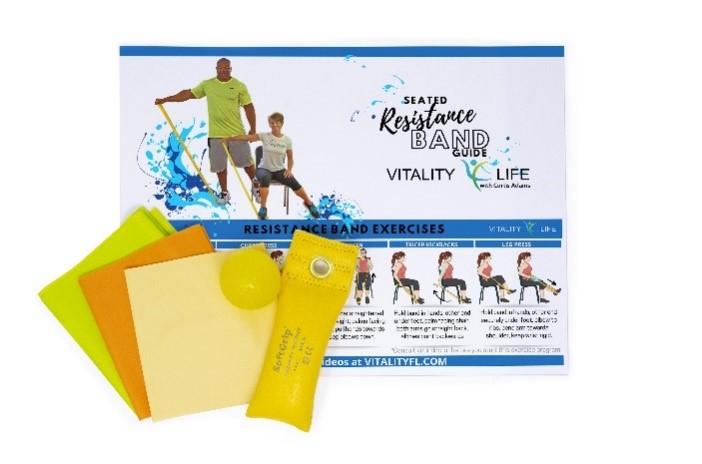
Light Fitness Kit – 99995

Light Fitness Kit #2 – 99991
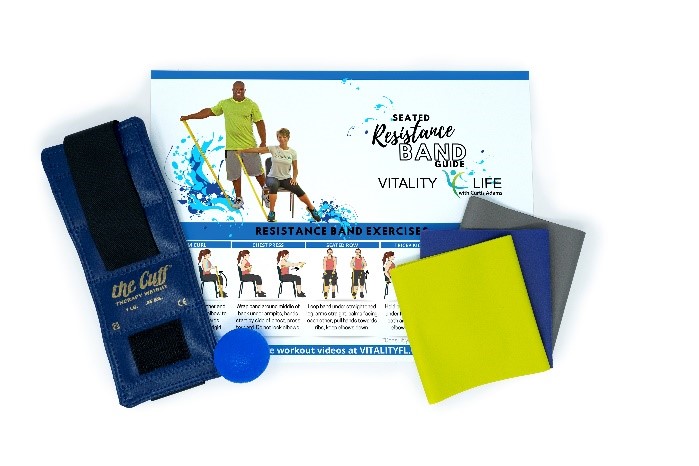
Medium Fitness Kit – 99996

Heavy Fitness Kit – 99993
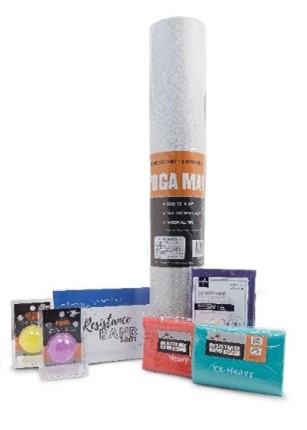
Heavy Fitness Kit #2 – 99997
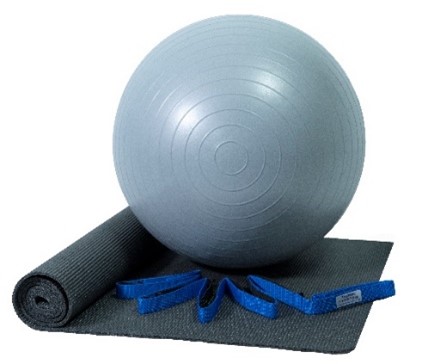
Yoga Kit – 99999
Here's how to order:
- Online. There are two easy ways to order fitness kits online:
- Log in to the UPMC Health Plan member site.
- Log in to the UPMC Health Plan app.
- By phone. Call 1-888-356-5009 (TTY: 711) seven days a week from 8 a.m. to 8 p.m. Have your UPMC for Life member ID card and date of birth ready.
If you are on a PPO plan that provides out-of-network coverage and you pay out-of-pocket for a covered fitness kit at a nonparticipating retailer, you can submit a claim for reimbursement.* You must have applicable allowance dollars remaining on your card to be reimbursed.
Not all plans include an allowance for fitness. Allowance amounts vary by plan. See your plan documents for your specific plan details.
How to submit a claim for reimbursement
If you pay out-of-pocket for covered products or services, you can submit a claim for reimbursement. For your claim to be processed, you must submit it within the required timeframe:
- If your plan has a quarterly allowance, you have up to 90 days after the end of the quarter in which the purchase was made to submit a claim.
- If your plan has a yearly allowance, you have up to 90 days after the end of the plan year in which the purchase was made to submit claim.
Here are all the ways you can submit a claim for reimbursement. You must have applicable allowance dollars remaining on your card to be reimbursed.
- Online:
- Log in to the UPMC Health Plan member site.
- On the Spending Accounts card on the homepage, click View Account Summary.
- Click Submit a Reimbursement Claim on the reimbursement card.
- By fax: Fax a completed reimbursement form and proper documentation to 1-844-361-4700.
- By mail: Mail a completed reimbursement form and proper documentation to UPMC Health Plan, PO Box 2784, Fargo, ND 58108.
- Mobile:
- Log in to the UPMC Health Plan app.
- Tap View Account Details under UPMC for Life Flex Spend Card on the insurance tab.
- Click Submit Reimbursement.
- By email: Send a completed reimbursement form and proper documentation to upmcforlife@healthaccountservices.com.
Submitted claims can take up to 72 hours to process. We will reimburse you by mailing you a check. Please allow 10-14 business days to receive your mailed check. Or you can set up direct deposit through the UPMC for Life Flex Spend Card Portal—see the Additional Resources section below for more information. After your claim is processed, please allow 24-48 hours to receive your direct deposit reimbursement.
You must include proper documentation for the expenses included on your reimbursement form. Please only include copies of your receipts. Do not send original receipts. Receipts cannot be returned to you or retrieved if lost.
Proper documentation for expenses includes a third-party receipt containing the following information:
- Date of the transaction
- Name of the merchant, store, or provider
- Name or description of the products(s) or service(s) purchased
- Dollar amount of the product(s) or services(s) purchased (after insurance, If applicable)
Unacceptable forms of documentation include the following:
- Provider statements that only indicate the amount paid, balance forward, or previous balance
- Credit card receipts that only reflect a payment
- Copies of checks
- Bills for prepaid expenses where services have not yet occurred
Frequently asked questions about using your Flex Spend Card
How do I get a UPMC for Life Flex Spend Card?
To receive a Flex Spend Card, you must be enrolled in a UPMC for Life plan that includes the Flex Spend Card benefit. New members enrolled in an eligible plan will receive their Flex Spend Card in the mail before their plan effective date. Current members should keep their current card and continue to use it until it expires.
If you are on a plan that does not include the Flex Spend Card benefit, but you earn preventive care rewards, you will be mailed a card preloaded with your reward dollars after you complete your first screening. Learn more about the preventive care reward program.
Does my allowance expire?
Allowance types vary by plan. If your plan has a yearly allowance, your allowance will expire Dec. 31 and will not roll over from year to year.
If your plan has a quarterly allowance, your allowance will expire at the end of the quarter and will not roll over from quarter to quarter. Please see the chart below for more information.
|
Allowance will be added: |
Allowance will expire: |
|
|
First quarter |
Jan. 1 |
March 31 |
|
Second quarter |
April 1 |
June 30 |
|
Third quarter |
July 1 |
Sept. 30 |
|
Fourth quarter |
Oct. 1 |
Dec. 31 |
Where can I use my Flex Spend Card?
Depending on your plan, here’s where the Flex Spend Card can be used:
- For medical service costs, you can use your card at providers that accept MasterCard.
- For dental, vision, and hearing services, you can use your card at providers that accept MasterCard.
- For premier fitness memberships, classes, and activities, you can use your card at participating premier fitness locations.
- For a fitness kit, you can purchase a kit from our participating fitness kit vendor.
- For covered OTC products, you can shop at participating retail stores and through our mail-order catalog
- For covered home safety products, you can purchase products through our mail-order catalog.
If you are on a PPO plan that provides out-of-network coverage and you pay out-of-pocket for covered products or services at nonparticipating providers or retailers, you can submit a claim for reimbursement.* You must have applicable allowance dollars remaining on your card to be reimbursed.
Allowances vary by plan. Not all plans include an allowance for medical service costs, fitness, or dental, vision, and hearing services. See your plan documents for your specific plan benefit details.
Can I use my Flex Spend Card for groceries?
The Flex Spend Card benefit cannot be used to buy groceries or healthy foods. If a member completes eligible preventive care, they will earn reward dollars that can be used to buy healthy foods at participating retailers. Learn more about the preventive care reward program.
How do I see my recent transactions?
Our digital tools are the easiest way to manage your Flex Spend Card. You can check your account balance, see your recent transactions, submit claims, and more. You can access these tools on both the UPMC Health Plan member site and the UPMC Health Plan app.
How do I know what OTC products are covered at retail stores?
You can use the Eligible Product Lookup tool in the UPMC Health Plan member site, or use the Barcode Scanner Tool in-store while you shop! The Barcode Scanner Tool is available in the UPMC Health Plan app. To use it, simply log in to the app, tap Scan Items on the Insurance tab, and then scan the product’s barcode to see if it’s covered.
Flex Spend Card additional resources
- UPMC for Life Flex Spend Card Catalog
- UPMC for Life Over-the-Counter Order Form
- UPMC for Life Flex Spend Card Reimbursement Form
- Set up direct deposit on the UPMC for Life Flex Spend Card Portal:
- Log in to the UPMC Health Plan member site.
- On the Spending Accounts card on the homepage, click View Account Summary.
- Click Flex Spend Card Resources, then click UPMC for Life Flex Spend Card Portal.
- Once on the portal, select Accounts, then Banking/Card.
- Click Add Bank Account, complete the required fields, and click Submit.
- Within the next 24 hours, a small microdeposit will be added to your bank account. Once the deposit is made, go back to the UPMC for Life Flex Spend Card Portal and click One or more bank accounts require activation under Tasks.
- Enter the amount that was deposited into your account and click Submit.
- Next, go to Accounts and click Payment Method.
- Click Update. Select Direct Deposit and click Submit.
- Access the UPMC for Life OTC Store:
- Online:
- Log in to the UPMC Health Plan member site.
- On the Spending Accounts card on the homepage, click View Account Summary.
- Click Over-the-counter (OTC) Resources, then click UPMC for Life OTC Store.
- Mobile:
- Log in to the UPMC Health Plan app.
- Tap View Account Details under UPMC for Life Flex Spend Card on the insurance tab.
- Click Over-the-Counter Store.
- Online:
Protect yourself from Flex Spend Card scams!
UPMC for Life will never ask you for personal information, banking information, or your Flex Spend Card number on any public webpage.
Learn more about how to protect yourself from scams.
* Terms and conditions apply. Submitting a claim does not guarantee reimbursement. See your plan documents for a description of benefits, exclusions, limitations, and conditions of coverage.
Medicare resources
This information is not a complete description of benefits. Call 1-866-400-5077 (TTY: 711) for more information. Out-of-network/Noncontracted providers are under no obligation to treat UPMC for Life members, except in emergency situations. Please call our customer service number or see your Evidence of Coverage for more information, including the cost sharing that applies to out-of-network services. Other physicians/providers are available in the UPMC for Life network.
This information is available for free in other languages. Please call our customer service number at 1-877-539-3080 (TTY: 711).
UPMC for Life has a contract with Medicare to provide HMO, HMO D-SNP, and PPO plans. The HMO D-SNP plans have a contract with the PA State Medical Assistance program. Enrollment in UPMC for Life depends on contract renewal. UPMC for Life is a product of and operated by UPMC Health Plan Inc., UPMC Health Network Inc., UPMC Health Benefits Inc., UPMC for You Inc.
SilverSneakers is a registered trademark of Tivity Health Inc. SilverSneakers GO is a trademark of Tivity Health Inc. © 2026 Tivity Health Inc. All rights reserved.
UPMC for Life Members
Call us: 1-877-539-3080
TTY: 711
Oct. 1 – March 31:
Seven days a week from 8 a.m. to 8 p.m.
April 1 – Sept. 30:
Monday through Friday from 8 a.m. to 8 p.m.
UPMC for Life Prospective Members
Call us: 1-866-400-5077
TTY: 711
Oct. 1 – March 31:
Seven days a week from 8 a.m. to 8 p.m.
April 1 – July 31:
Monday through Friday from 8 a.m. to 8 p.m.
Aug. 1 – Sept. 30:
Monday through Friday from 8 a.m. to 8 p.m. Saturday from 9 a.m. to 3 p.m.